AI Agents Explained
From LLMs to Autonomous Systems
TL;DR:
AI agents go beyond chat: they perceive, reason, plan, act, and learn in a loop. This course covers the architecture that makes agents tick, compares 7 major frameworks (LangChain, LangGraph, CrewAI, AutoGen, LlamaIndex, Semantic Kernel, AgentGPT), walks through 5 proven use cases with real ROI data, and gives you a production checklist so your first agent doesn't become an expensive hallucination machine.

Who this course is for
This course is for developers, product managers, and technical decision-makers who hear “AI agents” everywhere and want to understand what they actually are, when they're worth building, and how to avoid the most common pitfalls. It's also for founders and team leads evaluating agent frameworks for their products.
You should be comfortable with basic AI concepts (AI Fundamentals) and have used an LLM like ChatGPT or Claude. No coding experience is required — code examples are in pseudocode.
Developers & Engineers
Product Managers
Founders & Decision-Makers
What you'll learn
Agent vs LLM
Understand the fundamental difference between a stateless LLM and an autonomous agent with memory, planning, and tool use.
Agent Architecture
Master the Perceive-Reason-Plan-Act-Learn loop and the 6 core components every agent needs.
Framework Landscape
Compare LangChain, LangGraph, CrewAI, AutoGen, and more — and know which to pick for your use case.
Real-World ROI
Study 5 proven agent deployments with hard numbers: customer support, code review, research, maintenance, recruitment.
Build Your First Agent
Walk through a complete agent design — from goal decomposition to tool selection to error handling.
Production Readiness
Ship agents safely with observability, guardrails, human-in-the-loop escalation, and cost controls.

What Are AI Agents?
The shift from response to autonomy
A standard LLM is stateless: you send a prompt, it returns a response, done. It doesn't remember what happened before, can't use tools, and can't break a complex goal into steps. Think of it as an extremely well-read expert sitting in a room — brilliant at answering questions, but unable to leave the room, open a browser, or check a database.
An AI agent is that expert plus a planner, a toolbox, and a feedback loop. It can perceive its environment, reason about goals, plan multi-step actions, execute them using external tools (APIs, databases, code), and learn from the results. The key difference: agents act autonomously toward a goal, while LLMs react to a single prompt.
The one-sentence test
Three levels of AI autonomy
Level 1: Plain LLM
Single prompt → single response. No memory, no tools, no planning. Example: "Summarize this email."
Best for: Simple Q&A, text generation, translation, classification.
Level 2: Single Agent
Goal → plan → tool calls → iteration → result. Has memory, can use APIs, adapts based on feedback. Example: "Research the top 3 competitors and write a comparison report."
Best for: Multi-step tasks, research, data analysis, customer support.
Level 3: Multi-Agent System
Multiple specialized agents collaborate. A "Researcher" agent finds data, an "Analyst" agent interprets it, a "Writer" agent drafts the report. They coordinate via an orchestrator.
Best for: Complex workflows, enterprise automation, creative pipelines.

Anthropic's 5 workflow patterns (before you build an agent)
From “Building Effective Agents” — the most influential guide in the industry.
Anthropic draws a crucial distinction: workflows are systems where LLMs and tools follow predefined code paths. Agents are systems where the LLM dynamically directs its own process. Most tasks need a workflow, not an agent.
1. Prompt Chaining
A fixed sequence of LLM calls, each processing the output of the previous one. Add programmatic gates between steps to verify quality.
Example: Generate marketing copy → Translate to German → Check brand guidelines
When: Task can be cleanly decomposed into fixed subtasks. You trade latency for accuracy.
2. Routing
Classify the input and direct it to a specialized handler. Each handler has its own optimized prompt and tools.
Example: Customer query → Classify (refund / technical / general) → Route to specialist prompt
When: Distinct categories that need different handling. Optimizing for one category hurts another.
3. Parallelization
Run the same task multiple times (voting) or split it into independent parts (sectioning) and aggregate results.
Example: Code review: one LLM checks security, another checks style, a third checks logic — aggregate findings
When: Speed matters, or you need multiple perspectives for higher confidence.
4. Orchestrator-Workers
A central LLM dynamically breaks down the task and delegates to worker LLMs. Unlike parallelization, subtasks aren't predefined.
Example: Coding agent: orchestrator analyzes PR, decides which files to change, delegates each file edit to a worker
When: You can't predict the subtasks upfront. The orchestrator figures it out at runtime.
5. Evaluator-Optimizer
One LLM generates a response, another evaluates it and provides feedback, looping until quality is sufficient.
Example: Literary translation: translator LLM drafts → evaluator LLM critiques nuances → translator revises → repeat
When: Clear evaluation criteria exist, and iterative refinement provides measurable value.

Anthropic's golden rule
When do you actually need an agent?
Not every AI task needs an agent. In fact, most don't. According to the 2026 LangChain State of Agent Engineering survey, the top use cases where agents outperform plain LLMs are:
Customer Service
Multi-turn conversations with tool lookups and escalation decisions
Research & Data Analysis
Synthesizing information across multiple sources with reasoning
Internal Automation
Workflow orchestration across multiple systems and APIs
Code Generation & Review
Multi-file changes, test generation, security scanning
Anti-pattern: Agent for everything
Decision: Do I need an agent?
- 1Pick a task you currently solve with ChatGPT or Claude.
- 2Ask: Does it require multiple steps? Tool calls? Adaptive decisions?
- 3If YES to 2+ of these → agent territory. If NO → a well-crafted prompt is enough. Browse AI Agent Tools
Agent Architecture Deep-Dive
The PRPAL Loop: How every agent thinks
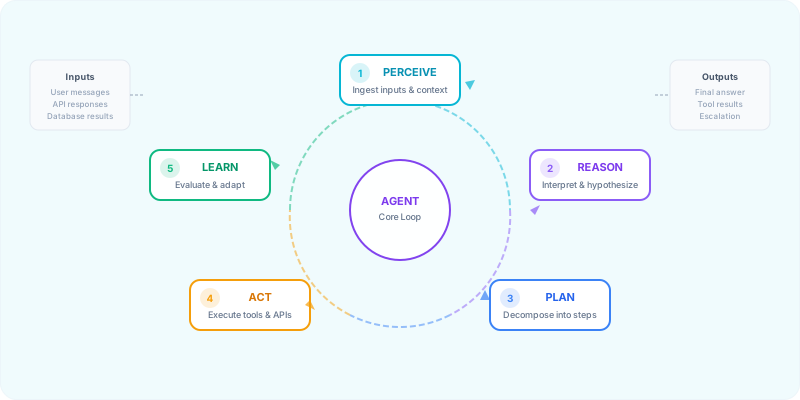
Every AI agent — regardless of framework — follows the same fundamental loop. We call it PRPAL (Perceive → Reason → Plan → Act → Learn). Understanding this loop is the single most important concept in this course, because it explains why agents succeed, why they fail, and where to intervene.
1. Perceive
Ingest inputs: user messages, API responses, database results, sensor data. The agent builds a representation of its current state.
2. Reason
Interpret context, form hypotheses, evaluate constraints. This is where the LLM backbone does its work — understanding what the user wants and what the current situation is.
3. Plan
Decompose the goal into sub-tasks. Decide which tools to use, in what order, and what to do if a step fails. This is the "thinking before acting" phase.
4. Act
Execute the plan: call APIs, run code, query databases, send messages. Monitor execution for errors and deviations.
5. Learn
Evaluate results against the original goal. Update memory, adjust strategy, and decide: Are we done, or do we loop back to step 1?
The 6 core components
Under the hood, every agent is built from six interconnected modules. Some frameworks expose them explicitly; others hide them behind abstractions. But they're always there.
Perception Module
Ingests raw data (text, images, API responses) and transforms it into structured representations the agent can reason over.
Planning Engine
Breaks goals into ordered sub-tasks. Uses reasoning frameworks like ReAct or Plan-and-Execute to evaluate possible actions.
Memory Store
Short-term (conversation context) + long-term (vector DB). Enables the agent to remember past interactions and learn over time.
Tool Executor
Interfaces with APIs, databases, code interpreters, and external services. This is what gives agents their "hands."
Learning Module
Evaluates outcomes, processes feedback, and updates the agent's strategy. Enables self-improvement across iterations.
Orchestrator
Manages state, handles errors, enforces guardrails, and coordinates the other 5 modules. The "brain stem" of the agent.
Agent reasoning patterns
How an agent decides what to do next is determined by its reasoning pattern. These are the three most important patterns you'll encounter:
ReAct (Reasoning + Acting)
The agent alternates between thinking (reasoning about what to do) and acting (executing a tool call), then observes the result before thinking again. This is the most common pattern and the default in LangChain.
Flow: Thought → Action → Observation → Thought → Action → ... → Final Answer
Plan-and-Execute
The agent creates a complete plan upfront, then executes each step sequentially. Better for complex, multi-step tasks where you want predictability. Used in LangGraph and some CrewAI setups.
Flow: Goal → Full Plan → Execute Step 1 → Execute Step 2 → ... → Final Answer
Reflection / Self-Critique
After generating an output, the agent critiques its own work and iterates. Dramatically improves quality for writing, code generation, and analysis tasks.
Flow: Draft → Self-Critique → Revised Draft → Self-Critique → ... → Final Answer
You are a helpful research assistant with access to the following tools:
{tools}

To answer the user's question, use this exact format:

Thought: I need to figure out [what you're thinking]
Action: [tool_name]
Action Input: [input for the tool]
Observation: [result from the tool — you'll receive this]

...repeat Thought/Action/Observation as needed...

Thought: I now have enough information to answer.
Final Answer: [your complete answer to the user]

Important rules:
- Always start with a Thought.
- Never make up tool results — wait for the Observation.
- If a tool fails, explain why and try a different approach.
- Limit yourself to {max_iterations} iterations.

User question: {question}
Memory systems: How agents remember
Memory is what separates a stateless LLM from a persistent agent. There are three types of memory an agent can use:
Short-Term Memory
Current conversation context. Lives in the context window. Lost when the session ends.
Long-Term Memory
Stored in a vector database. Persists across sessions. Used for user preferences, past interactions, learned facts.
Procedural Memory
How to do things: tool usage patterns, successful strategies, learned workflows. Often encoded in system prompts or fine-tuned weights.
Sketch your agent architecture
- 1Pick a task from your work (e.g., "research competitors and write a summary").
- 2Map it to the PRPAL loop: What does the agent perceive? What does it reason about? What's the plan? What tools does it need? How does it know it's done?
- 3Identify which of the 6 components are critical for your task and which are optional. Explore AI Development Tools
Frameworks & Tools Landscape
The 7 major frameworks (2026)
Each framework has a sweet spot. Picking the wrong one costs weeks.
| Framework | Best For | Multi-Agent | Enterprise | Complexity |
|---|---|---|---|---|
| LangChain | General purpose, prototyping | ⚠️ | ✅ | Medium |
| LangGraph | Complex stateful workflows | ✅ | ✅ | High |
| CrewAI | Role-based agent teams | ✅✅ | ⚠️ | Low |
| AutoGen | Conversational multi-agent | ✅ | ✅ | Medium |
| LlamaIndex | Data-heavy RAG workflows | ⚠️ | ✅ | Medium |
| Semantic Kernel | .NET / Enterprise | ⚠️ | ✅✅ | Medium |
| AgentGPT | Browser-based, no-code | ❌ | ❌ | Low |
Framework decision tree
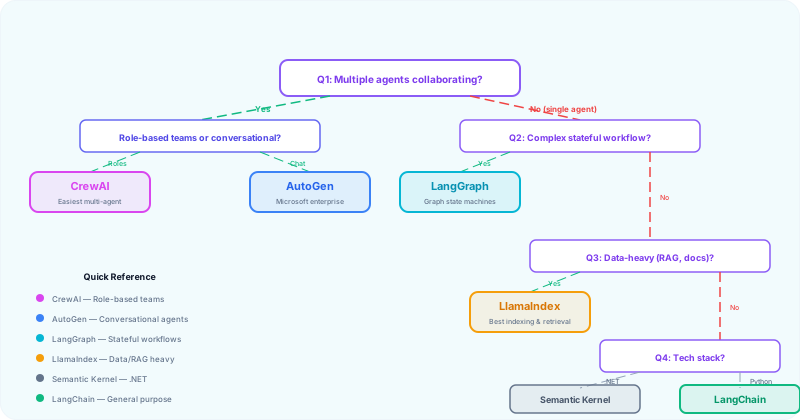
Answer 4 questions to find your framework.
Q1: Do you need multiple agents collaborating?
Yes, role-based teams → CrewAI (easiest multi-agent setup)
Yes, conversational agents → AutoGen (agents talk to each other)
No, single agent → Continue to Q2
Q2: How complex is your workflow?
Complex, stateful, with branching → LangGraph (graph-based state machines)
Standard, linear → Continue to Q3
Q3: Is your task data-heavy (RAG, document analysis)?
Yes → LlamaIndex (best indexing and retrieval)
No → Continue to Q4
Q4: What's your tech stack?
.NET / Microsoft ecosystem → Semantic Kernel
Python / General → LangChain (largest ecosystem, most tutorials)
No-code / Quick prototype → AgentGPT (browser-based)
Framework ≠ magic
Tool integration & the Agent-Computer Interface (ACI)
Anthropic's most underrated insight: tool design matters as much as prompt design.
An agent without tools is just an LLM with extra steps. Tools are what make agents useful. Every framework supports tool integration, but the patterns differ:
API Tools
REST/GraphQL endpoints: search engines, weather, CRM, databases. The most common tool type.
Code Execution
Run Python/JS code in a sandbox. Essential for data analysis, calculations, and file manipulation.
Database Tools
SQL queries, vector DB searches (Pinecone, Weaviate, Chroma). Critical for RAG and data-heavy agents.
Human-in-the-Loop
Ask a human for approval or input when confidence is low. The most underrated "tool" in production agents.
The ACI Principle (Agent-Computer Interface)
Anthropic spent more time optimizing tools than prompts when building their SWE-bench agent. Their key insight: treat tool design like UX design. Just as you invest in Human-Computer Interfaces (HCI), invest equally in Agent-Computer Interfaces (ACI).
• Make it obvious: If you'd need to think carefully about how to use the tool, so will the LLM. Add examples and edge cases to the description.
• Poka-yoke your tools: Design parameters so mistakes are impossible. Use absolute paths instead of relative ones. Validate inputs.
• Test with real inputs: Run many examples to see what mistakes the model makes, then iterate on the tool definition.
• Keep format natural: Use formats the model has seen in training data. Avoid formats that require counting lines or escaping strings.
# Define a tool for your agent
tool_name: "search_company_database"
description: "Search the internal company database for customer records, orders, or product information. Use this when the user asks about specific customers, orders, or products."
parameters:
  query:
    type: string
    description: "The search query — can be a customer name, order ID, or product name"
    required: true
  limit:
    type: integer
    description: "Maximum number of results to return (default: 5)"
    required: false
returns: "A JSON array of matching records with id, name, and relevant fields"
error_handling: "If no results found, return an empty array and suggest the user refine their query"
Pick your framework
- 1Walk through the decision tree above with a real project in mind.
- 2Visit the framework's documentation and read the "Getting Started" guide.
- 3Build a minimal "hello world" agent with one tool (e.g., a calculator or search). Compare AI Development Frameworks
Real-World Use Cases with ROI Data
Theory is nice. Numbers are better. Here are 5 proven agent deployments with hard data from 2026 production environments. These aren't demos — they're running at scale in Fortune 500 companies.
1. Customer Support Agent
ROI
85–90% cost reduction per interaction
Global Impact
$80B in global cost savings by 2026
Agent Workflow
Intent Detection → Knowledge Retrieval → Response Generation → Escalation Decision
Key insight
2. Code Review Agent
ROI
450,000 developer hours saved (single company)
Global Impact
25–39% productivity gains across engineering teams
Agent Workflow
PR Analysis → Security Scan → Style Check → Suggestion Generation → Human Approval
Key insight
3. Research & Data Analysis Agent
ROI
40% productivity increase for knowledge workers
Global Impact
95% reduction in query time (Suzano: 50,000 employees)
Agent Workflow
Query Understanding → Multi-Source Search → Synthesis → Report Generation
Key insight
4. Predictive Maintenance Agent
ROI
10:1 to 30:1 ROI in manufacturing
Global Impact
30–50% reduction in unplanned downtime
Agent Workflow
Sensor Monitoring → Anomaly Detection → Root Cause Analysis → Action Recommendation
Key insight
5. Recruitment Agent
ROI
Hiring time reduced from 6 weeks to 2 weeks
Global Impact
75% reduction in cost-per-hire for high-volume roles
Agent Workflow
Resume Screening → Candidate Matching → Interview Scheduling → Feedback Collection
Key insight
Agent success stories everyone knows (2026)
From the LangChain State of AI Agents survey — the most-cited production agents.
51% of organizations now have agents in production (LangChain survey, 1,300+ respondents). Mid-sized companies (100–2,000 employees) lead at 63%. These are the breakout success stories:
Cursor
AI-powered code editor that helps developers write, debug, and parse code. Uses agent patterns to make multi-file changes, run tests, and iterate on solutions.
Why it works: Code is verifiable through automated tests — agents can iterate using test results as feedback.
Perplexity
AI answer engine that searches the web, synthesizes multiple sources, and provides cited answers. The research-and-summarize pattern at scale.
Why it works: Research tasks have clear success criteria and benefit from multi-source synthesis.
Replit
Sets up environments, configurations, and lets you build and deploy fully functional apps in minutes. Full orchestrator-workers pattern.
Why it works: Software development is well-structured and outputs are objectively verifiable.
Anthropic's pattern for agent success
Find your highest-ROI use case
- 1List 3 repetitive, multi-step tasks in your organization.
- 2For each, estimate: How many hours/week does it consume? What's the error rate? What's the cost of a mistake?
- 3Check against Anthropic's 4 traits: conversation + action, clear success criteria, feedback loops, human oversight.
- 4The task with the highest (hours × cost) and all 4 traits is your best first agent candidate. Browse AI Automation Tools
Building Your First Agent
Step-by-step: A research agent
Let's walk through designing a complete agent from scratch.
Imagine you need an agent that can research a topic, synthesize findings from multiple sources, and produce a structured summary. Here's how you'd design it using the PRPAL framework:
Step 1: Define the Goal
“Given a topic, find the 3 most relevant sources, extract key points from each, and produce a 500-word summary with citations.”
Step 2: Decompose into Sub-Tasks
1. Search the web for the topic → get 10 results
2. Rank results by relevance → select top 3
3. Extract key content from each source
4. Synthesize into a structured summary
5. Self-critique: Is the summary accurate and complete?
6. If not → loop back to step 1 with refined query
Step 3: Select Tools
• web_search(query) — Search the web
• extract_content(url) — Extract text from a URL
• summarize(texts, format) — Synthesize multiple texts
Step 4: Add Guardrails
• Max iterations: 3 (prevent infinite loops)
• Max tool calls: 10 (prevent cost explosion)
• Timeout: 60 seconds per tool call
• Fallback: If search fails, return “I couldn't find reliable sources”
# Research Agent (Pseudocode — works with any framework)

GOAL = "Research {topic} and produce a 500-word summary with citations"

TOOLS = [
    web_search(query) → list of URLs,
    extract_content(url) → text content,
    summarize(texts, format) → structured summary,
]

GUARDRAILS = {
    max_iterations: 3,
    max_tool_calls: 10,
    timeout_per_call: 60s,
    fallback: "Could not find reliable sources for this topic."
}

# The Agent Loop (PRPAL)
for iteration in range(max_iterations):

    # 1. PERCEIVE: What do I know so far?
    context = get_current_context()

    # 2. REASON: What should I do next?
    next_action = llm.reason(GOAL, context, TOOLS)

    # 3. PLAN: Break it down
    if iteration == 0:
        plan = llm.create_plan(GOAL, TOOLS)

    # 4. ACT: Execute the next step
    result = execute_tool(next_action.tool, next_action.input)

    # 5. LEARN: Did it work? Am I done?
    evaluation = llm.evaluate(result, GOAL)

    if evaluation.is_complete:
        return evaluation.final_answer

    # Not done — update context and loop
    update_context(result)

return GUARDRAILS.fallback
The 5 most common pitfalls
Infinite loops
Always set max_iterations and max_tool_calls. No exceptions.
Tool hallucination
The LLM invents tool names or parameters that don't exist. Validate every tool call against your registered tools.
Context overflow
Long conversations exceed the context window. Implement summarization or sliding-window memory.
Cost explosion
Each iteration costs money. Set budget limits and monitor spend per agent run.
No error handling
Tools fail. APIs timeout. Always have fallback responses and retry logic with exponential backoff.
The Role-Goal-Backstory framework (from CrewAI)
The most effective pattern for defining agent identity — used by CrewAI, the leading multi-agent framework.
CrewAI discovered that agents perform dramatically better when given specialized identities instead of generic instructions. Every effective agent needs three things:
Role: What the agent does
Be specific. Not “Writer” but “Technical Documentation Specialist for developer APIs.”
Why: Specialized agents deliver more precise, consistent outputs than generalists.
Goal: What success looks like
Not “Write good content” but “Produce clear, accurate API documentation that a junior developer can follow without asking questions.”
Why: Clear goals with quality standards help the LLM self-evaluate its output.
Backstory: Why the agent is credible
Not just skills, but perspective. “You have 15 years of experience writing docs for top tech companies. You believe good documentation is invisible — users find answers without noticing the writing.”
Why: Backstory shapes how the agent approaches problems, not just what it does.
# Agent Identity (Role-Goal-Backstory Framework)

role: "Senior UX Researcher specializing in user interview analysis"

goal: "Uncover actionable user insights by analyzing interview data
and identifying recurring patterns, unmet needs, and improvement
opportunities that the product team can act on immediately"

backstory: "You have spent 15 years conducting and analyzing user
research for top tech companies. You have a talent for reading
between the lines and identifying patterns that others miss.
You believe that good UX is invisible and that the best insights
come from listening to what users don't say as much as what they
do say."

# Key principle: Specialists > Generalists
# "Writer" → weak. "Technical Blog Writer specializing in
# explaining complex AI concepts to non-technical audiences" → strong.
Anthropic's 3 core principles for agent design
From the team that builds Claude — the most practical agent design advice in the industry:
Maintain simplicity
Start with the simplest architecture that could work. A single LLM call with good retrieval beats a complex multi-agent system 90% of the time. Add complexity only when you can measure the improvement.
Prioritize transparency
Explicitly show the agent's planning steps. Users (and developers) need to see what the agent is thinking. Hidden reasoning is undebuggable reasoning.
Craft your ACI carefully
Invest as much effort in your Agent-Computer Interface (tool definitions, parameter names, error messages) as you would in a user interface. The model's ability to use tools correctly depends entirely on how well you've designed them.
Design your first agent
- 1Define a clear goal for a task you do repeatedly.
- 2Write a Role-Goal-Backstory using the template above.
- 3Decompose the task into 3–5 sub-tasks and list the tools needed.
- 4Add guardrails: max iterations, timeout, fallback response.
- 5Write the agent loop in pseudocode. Start simple — you can always add complexity later. Find AI Agent Platforms
Production Readiness
The 3 biggest barriers (2026 data)
According to the 2026 LangChain survey of 1,300+ professionals, these are the top blockers preventing agents from reaching production:
Quality
Accuracy, relevance, consistency, and adherence to brand/policy guidelines. The #1 blocker for two years running.
Latency
Multi-step agents are slow. Each reasoning step adds 1–5 seconds. Customer-facing agents need sub-second responses for simple queries.
Security
Data leakage, prompt injection, unauthorized tool access. Especially critical for enterprises with 10K+ employees.
Observability: You can't fix what you can't see
89% of organizations with agents in production have implemented observability. Among those with agents already deployed, 71.5% have detailed tracing that lets them inspect individual agent steps and tool calls. This isn't optional — it's table stakes.
Trace every step
See exactly what the agent thought, which tool it called, and what it got back. Essential for debugging.
Log latency per step
Identify bottlenecks. Is the LLM slow? Is a specific API timing out? Where's the 80/20?
Track cost per run
Each agent run has a cost (LLM tokens + API calls). Set alerts when cost exceeds thresholds.
Monitor success rate
What percentage of agent runs achieve the goal? Track this over time to catch regressions.
Agent control patterns: How much autonomy to give
From the LangChain survey — how companies actually manage agent permissions.
Very few organizations let agents read, write, and delete freely. Most take a conservative approach:
Read-Only
Agent can search and retrieve data but cannot modify anything. Safest option for enterprises. Start here.
Human Approval
Agent proposes actions, human approves before execution. Best balance of speed and safety for write operations.
Full Autonomy
Agent acts independently. Only for well-tested, low-risk tasks with comprehensive guardrails and monitoring.
IBM's warning on agent risks
Production checklist
Don't ship an agent without checking every box.
# Agent Production Readiness Checklist

## Quality
- [ ] Agent achieves goal in ≥80% of test cases
- [ ] Outputs are consistent across identical inputs
- [ ] Tone and format match brand guidelines
- [ ] Hallucination rate is below acceptable threshold

## Safety & Security
- [ ] Input validation: reject prompt injection attempts
- [ ] Output filtering: no PII, no harmful content
- [ ] Tool access: principle of least privilege
- [ ] Data flow: know where every piece of data goes
- [ ] Audit trail: every action is logged

## Performance
- [ ] Average response time meets SLA (e.g., <10s for support)
- [ ] Max iterations capped (e.g., 5)
- [ ] Max tool calls capped (e.g., 15)
- [ ] Timeout per tool call (e.g., 30s)
- [ ] Cost per run within budget (e.g., <$0.50)

## Observability
- [ ] Full tracing enabled (every step visible)
- [ ] Latency monitoring per step
- [ ] Cost tracking per run
- [ ] Success rate dashboard
- [ ] Alert on anomalies (cost spike, error rate spike)

## Human-in-the-Loop
- [ ] Confidence threshold defined (e.g., <0.7 → escalate)
- [ ] Escalation path tested and working
- [ ] Human agents have full context when escalated
- [ ] Feedback loop: human corrections improve the agent

## Testing
- [ ] Unit tests for each tool
- [ ] Integration tests for complete workflows
- [ ] Adversarial tests (edge cases, malicious inputs)
- [ ] Load tests (concurrent agent runs)
- [ ] Regression tests (new deployments don't break existing behavior)
Audit an existing agent (or plan one)
- 1Take the production checklist above and score your agent (or planned agent) on each item.
- 2Identify the 3 weakest areas.
- 3For each weak area, define one concrete action to fix it this week. Explore AI Monitoring Tools
Design Your Agent
Time to put everything together. Use the Agent Design Canvas below to design a complete agent for a real task in your work or life.
# Agent Design Canvas

## 1. Agent Identity
Agent Name: _______________
Purpose (one sentence): _______________
Target User: _______________

## 2. Goal Definition
Primary Goal: _______________
Success Criteria: _______________
What does "done" look like?: _______________

## 3. Task Decomposition
Sub-Task 1: _______________
Sub-Task 2: _______________
Sub-Task 3: _______________
Sub-Task 4: _______________
Sub-Task 5: _______________

## 4. Tools Required
Tool 1: _______________ (purpose: _______________)
Tool 2: _______________ (purpose: _______________)
Tool 3: _______________ (purpose: _______________)

## 5. Architecture Decisions
Reasoning Pattern: [ ] ReAct  [ ] Plan-and-Execute  [ ] Reflection
Memory Type: [ ] Short-term only  [ ] + Long-term (vector DB)
Multi-Agent: [ ] No  [ ] Yes → Roles: _______________
Framework: _______________

## 6. Guardrails
Max Iterations: ___
Max Tool Calls: ___
Timeout per Call: ___s
Cost Budget per Run: $___
Fallback Response: _______________

## 7. Human-in-the-Loop
Escalation Trigger: _______________
Escalation Path: _______________

## 8. Expected ROI
Time Saved per Run: ___ minutes
Runs per Week: ___
Monthly Value: $___
Ready to Apply What You Learned?
AI Security & Privacy
Keep your agents safe — data flows, prompt injection defense, and GDPR compliance.
Start LearningAI Agent Tools on Best AI Tools
Explore agent frameworks, orchestration platforms, and monitoring tools in our database.
LangChain
The most popular framework for building LLM-powered agents with tool integration.
CrewAI
Role-based multi-agent collaboration framework — the easiest way to build agent teams.
AutoGen
Microsoft's enterprise-grade framework for conversational multi-agent systems.
LangGraph
Graph-based state machine framework for complex, stateful agent workflows.
LlamaIndex
Data-centric agent framework — best for RAG and document-heavy workflows.
AgentGPT
Browser-based autonomous agent — no code required, great for quick prototypes.
Test Your Knowledge
Complete this quiz to test your understanding of AI agents, architecture, frameworks, and production best practices.
Loading quiz...
Key Insights: What You've Learned
Start simple: most tasks need a single LLM call or a workflow (prompt chain, routing, parallelization) — not a full agent. Anthropic's golden rule: "Add complexity only when it demonstrably improves outcomes."
When you do need an agent, use the PRPAL loop (Perceive-Reason-Plan-Act-Learn) and define identity with CrewAI's Role-Goal-Backstory framework. Specialists outperform generalists every time.
In production, 51% of organizations already run agents (LangChain 2026). The top 3 barriers are quality (33%), security (24%), and latency (20%). Start with read-only permissions, add human approval for writes, and invest in observability from day one.