
"Transforming your words with precision"
Transforming your words with precision
Based on user reviews
Rating Distribution
Liam Davenport
3 months ago
Tried Paraphrasing Tool for about three weeks as part of my marketing copy workflow. The variety of AI modes and Chrome extension saved me a surprising amount of time versus QuillBot or Wordtune. Being able to switch from 'creative' to 'academic' tone is genuinely useful. Biggest gripe is the free version's 4k character limit-batch processing long blog posts gets tedious unless you upgrade. Not a game-changer for original content, but excellent for revisions and quick tone shifts.
Albert Schaper(Artificial Intelligence, AI Tools)
Albert Schaper has analyzed Paraphrasing Tool for Writing & Translation, giving it a 4.0/5 rating based on 1 user review. Given Albert Schaper's expertise in artificial intelligence, this tool is particularly recommended for content creators who prioritize artificial intelligence capabilities.
Pricing: $0 – $20 / month(Updated November 2025)
Free tier available; paid plans at $5/month (Solo Paraphrasing), $7/month (Basic Paraphrasing), $12/month (Solo Text Generation), $15/month (Text Generation + Paraphrasing), and $20/month (All-In-One Bundle); annual discounts available; prices in USD.
Usage Model: Pay-as-You-Go — ensuring you only pay for what you actually use.
The free tier of Paraphrasing Tool provides content creators with a risk-free way to experience writing & translation capabilities. Free users get access to fundamental features that are perfect for learning and basic workflows. Paid subscriptions unlock advanced tools, increased capacity, and professional features tailored for content creators with complex writing & translation needs.
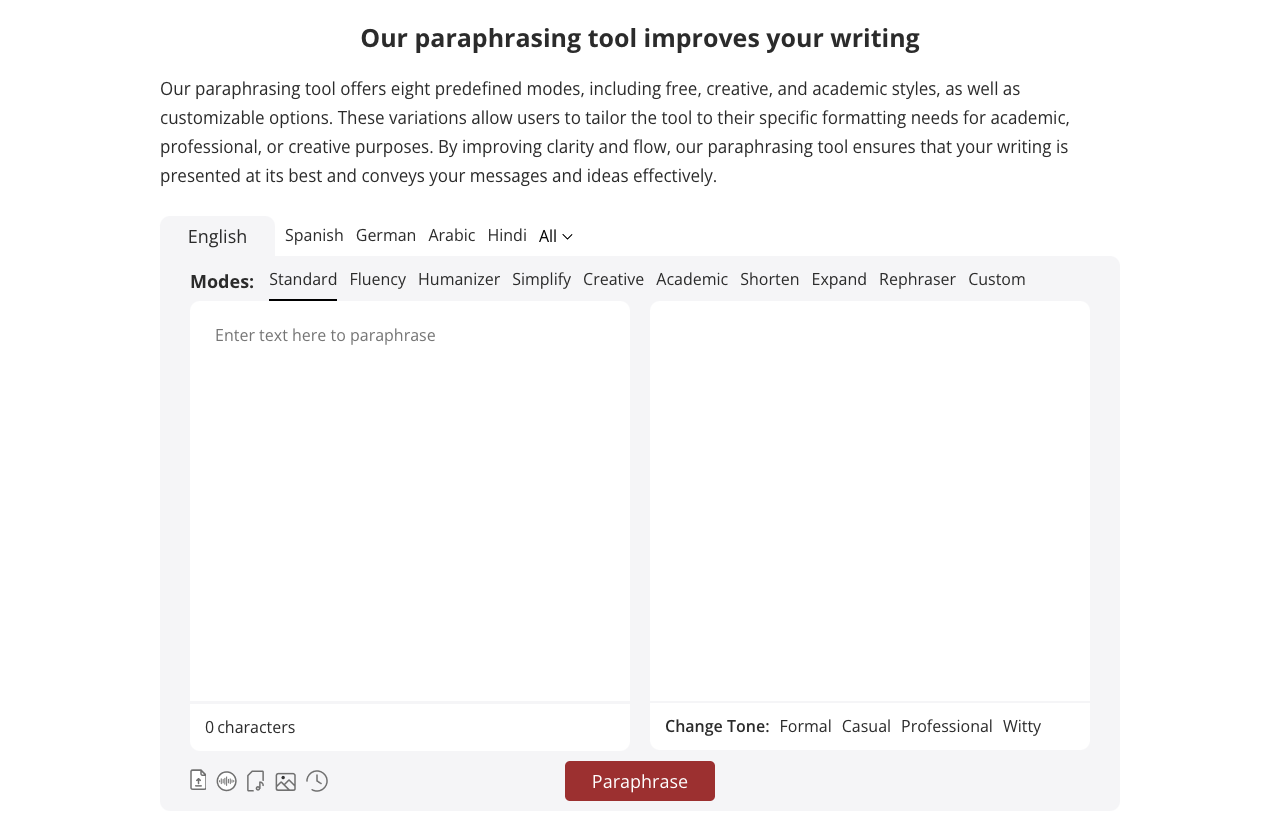
Paraphrasing Tool is an AI-powered platform that helps users rewrite and rephrase text using 12 distinct AI modes and custom tones. It supports writers, bloggers, marketers, professionals, and researchers by making content clearer, more original, and tailored to specific audiences. The platform is available via web app, browser extensions (Chrome, Firefox, Edge, Opera, Safari), and mobile apps for Android and iOS.
Understanding the core functionality and approach of Paraphrasing Tool.
Paraphrasing Tool meters activity so invoices mirror real adoption instead of seat assumptions. Experiments can scale without renegotiating budgets every quarter. Usage-based billing keeps costs aligned with real adoption.
Explore the powerful features that make Paraphrasing Tool stand out.
Real-time translation keeps multilingual teams aligned without delays. Available across Web App, Mobile App, and Browser Extension for consistent adoption.
Runs on Web App, Mobile App, and Browser Extension so teams stay productive on their preferred devices. Available across Web App, Mobile App, and Browser Extension for consistent adoption.
Developers get client libraries that smooth integration work.
Growth teams move faster when messaging, assets, and analytics live together. Paraphrasing Tool gives marketing teams a single view of campaigns, messaging, and performance.
Discover how different audiences leverage Paraphrasing Tool for their specific needs.
Translate user-generated content and reviews to understand global customer feedback. Paraphrasing Tool gives marketing teams a single view of campaigns, messaging, and performance.
Collaboration features keep stakeholders aligned throughout the creative process. Paraphrasing Tool gives marketing teams a single view of campaigns, messaging, and performance.
Creative, channel, and analytics roles collaborate in real time. Paraphrasing Tool gives marketing teams a single view of campaigns, messaging, and performance.
Discover more AI tools in related categories, platforms, and use cases.
Deepen your understanding of the concepts behind tools like Paraphrasing Tool with our expert guides.
Understand core concepts like LLMs and Machine Learning.
Master search, filtering, and comparison to find the perfect tool.
Learn to craft effective prompts to command AI models.
Integrate AI into your daily workflows ethically and effectively.
See how Paraphrasing Tool stacks up against similar alternatives in the market.
Explore these popular alternatives to Paraphrasing Tool for your specific needs.
Take your tool to the next level with Featured placements, Academy mentions with high-authority backlinks, 48h Fast‑Track listing, Newsletter features to thousands of AI practitioners, and exclusive Data/API access for growth insights.
Use this page as a starting point to evaluate Paraphrasing Tool alongside similar options. Our directory focuses on practical details that matter for adoption—capabilities, pricing signals, integrations, and real audiences—so you can shortlist with confidence and move from exploration to evaluation faster.
For a structured head‑to‑head, try the comparison view: Compare AI tools. To stay current with launches, model updates, and research breakthroughs, visit AI News. New to the space? Sharpen your understanding with AI Fundamentals.
Before adopting any tool, model your total cost at expected usage, verify integration coverage and API quality, and review privacy, security, and compliance. A short pilot on a real workflow will reveal reliability and fit quickly. Bookmark this site to track updates to Paraphrasing Tool and the broader ecosystem over time.
Found incorrect information or have concerns about Paraphrasing Tool? Let us know.
Looking for alternatives to Paraphrasing Tool or similar tools? Use our AI-powered chatbot to discover the perfect solution for your needs.


